Python is one of the most popular programming languages in the world, known for its simplicity, readability, and versatility. Whether you’re aiming to build web applications, automate tasks, analyze data, or dive into machine learning, Python serves as an excellent starting point for beginners.
If you’re new to coding, the idea of learning a programming language might seem daunting, but with the right approach, it can be an enjoyable and rewarding journey. This article will guide you through the process of learning Python from scratch, covering essential steps, resources, and tips to help you succeed. By the end, you’ll have a clear roadmap to becoming proficient in Python.
Why Learn Python?
Before diving into the how-to, it’s worth understanding why Python is ideal for beginners. Created by Guido van Rossum in the early 1990s, Python emphasizes code readability with its use of indentation and straightforward syntax.
Unlike languages like C++ or Java, which can overwhelm newcomers with complex rules, Python reads almost like English. For instance, printing(displaying) “Hello, World!” in Python is as simple as print(“Hello, World!”)—no need for semicolons or curly braces everywhere.
Python’s popularity stems from its wide applications. It’s the backbone of companies like Google, Netflix, and Instagram. Python scripts can handle repetitive tasks, saving hours of manual work and it’s simple and very easy to understand!
Learning Python not only opens doors to high-demand jobs (with average salaries often exceeding $100,000 in tech hubs) but also builds problem-solving skills applicable to everyday life.
Setting Up Your Python Environment
Install Python on your computer:
- Visit the official Python website at python.org.
- Download the latest version of Python 3.x (Python 2 is outdated and not recommended).
- Follow the user-friendly installer instructions based on your operating system:
- Run the .exe file and ensure you check the “Add Python to PATH” option.
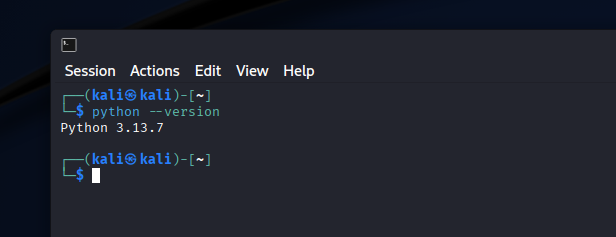
Verify the installation:
- Open a terminal or command prompt.
- Type python –version.
- You should see output like “Python 3.xx.x(version may vary)
Install Visual Studio Code
Highly recommended: Visual Studio Code (VS Code) from Microsoft—it’s free, extensible, and includes Python extensions for features like auto-completion and debugging.
Writing Your First Code – Setup
Let’s write your first Python code!
- Open up Visual Studio Code
- Head to extensions, install the following extensions from the extensions tab (cubes icon):
- Python Debugger, Python, Pylance
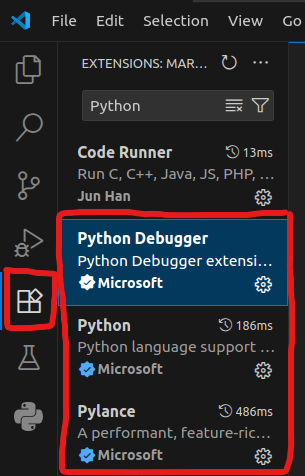
As soon as you install these extensions, Head to the top of the screen and press the following:
- File -> New File -> Python File
- Then: File -> Save As -> YourPythonFile.py [MAKE SURE THE .py IS THERE!! IT’S A PYTHON EXTENSION!!]
Writing Your First Code
Type in the following code into your file:
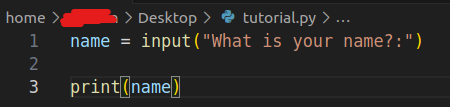
name = input("What is your name?:") #Creates a variable 'name' and asks for input

print(name) #Displays or Prints name from inputAs we can see, Python is simple to understand & read! It’s nearly like you’re writing English! But more of in a instructional language.
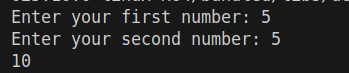
number1 = input("Enter your first number: ")
number2 = input("Enter your second number: ")

sum = int(number1) + int(number2)
print(sum)Running your code
To run your code, do the following:
- At the top of the screen, press Run -> Start Debugging -> Python Debugger -> Python File
Recommended Learning Resources
A wealth of free and paid resources exists for beginners. Start with the Free W3 Schools Tutorials as they are easy to understand & give you a great chance to learn quickly -> Click here
Also remember that YouTube is your friend! Plenty of resources & YouTubers to learn from!